I am having a difficult time wrangling Adaxes' custom attributes on v2025.1 to use them as placeholders to sync later or just have data visible in adaxes only. We are Entra ID only and the "On Prem AD" is just the Entra ID Domain Services. When referring to the user I am talking about the object in the mydomain.onmicrosoft.com domain object.

The first issue is, even with "Show Empty Properties" enabled, I cannot see any adm-CustomAttribute fields on a user profile, whether they have data in them or not. I even have some with custom property names and those are not visible either.

Second issue is even though we have Exchange Online ExtensionAttributes filled in Exchange Online. They are visibile if we go into the User Object > Exchange > General > Custom Attributes -- the same fields appear blank in the user pane. image.png image.png
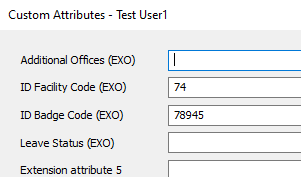
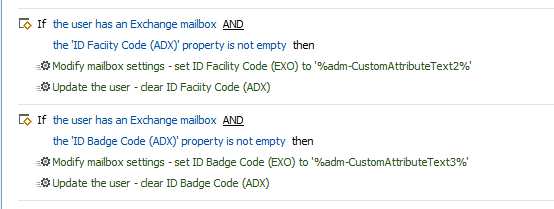
The third issue which caused me to go down this whole road to begin with is, I cannot simply update ExtensionAttribute that is maintained in Exchange Online via the edit user or a form/command. I've had to devise a clever workaround to directly modify mailbox settings and then the ExtensionAttribute which works, but is clunky. And with no visibility of the fields, makes troubleshooting issues with this method more difficult. image.png
Fourth, I am attempting to use the Update User script here: https://scripts.adaxes.com/import-new-and-updated-users-from-csv-file yet when I defind simply the username and 2 attributes and run the script, it appears nothing happens.

$csvFilePath = "C:\Users\myprofile\Desktop\imports\testbatch.csv" # TODO: modify me
$userIdColumn = "displayName" # TODO: modify me
$userIdProperty = "userPrincipalName" # TODO: modify me
$accountPasswordColumn = "AccountPassword" # TODO: modify me
$customColumnNames = @{
    "extensionAttribute2" = "adm-CustomAttributeText2";
    "extensionAttribute3" = "adm-CustomAttributeText3";
} # TODO: modify me
$ignoreUnspecifiedColumns = $True # TODO: modify me
$aDObjectProperties = @("Manager", "Secretary") # TODO: modify me
$skipEmptyColumnNames = @("MyColumn") # TODO: modify me
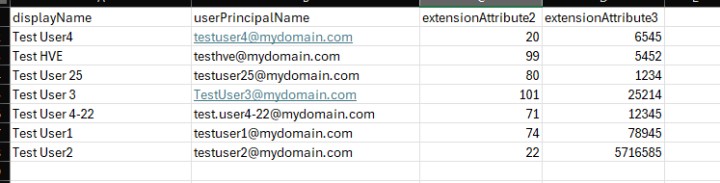
image.png

What I am trying to accomplish is get 2 ExtensionAttributes that already have data in them, be visible and editable in Adaxes. The stop-gap I was attempting to make to negate the second issue was to create duplicate fields using the adm-CustomAttribute field and then import the values of the ExtensionAttribute exported from Exchange and use a custom task to sync/overwrite the ExtensionAttributes from the ones saved in Adaxes.

So my questions are:

  • Is it possible to make ExtensionAttributes visible in the user page without clicking all the way into mailbox and custom attributes? And by extension, run a report in Adaxes showing these values as shown in Exchange Online?

  • Is it possible to make visible the adm-CustomAttribute fields regardless if they have data or not?

  • Can I make a form field to fill out the ExtensionAttribute directly rather than using a custom scheduled task to sync adm-CustomAttribute values to ExtensionAttribute

  • How can I bulk import from CSV values to adm-CustomAttribute and verify that they were saved?

ago by (90 points)

1 Answer

ago by (308k points)
0 votes

Hello,

The behavior is by design. In such an environment extension attributes are only available when viewing Exchange properties of an object. There is no possibility to view or update them as regular properties.

As an option, you can use the import script from our repository to update Adaxes custom attributes and then set the same values to extension attributes in a business rule (exactly as in your screenshot). At the same time, you can add Adaxes custom attributes to web interface forms so that they are visible even without viewing Exchange properties. In the Administration console, the attribute values can be viewed in the result pane when selecting an object.

ago by (90 points)
0

So I tried using the script and it doesn't seem to work.

Fourth, I am attempting to use the Update User script here: https://scripts.adaxes.com/import-new-and-updated-users-from-csv-file yet when I defind simply the username and 2 attributes and run the script, it appears nothing happens.

$csvFilePath = "C:\Users\myprofile\Desktop\imports\testbatch.csv" # TODO: modify me
$userIdColumn = "displayName" # TODO: modify me
$userIdProperty = "userPrincipalName" # TODO: modify me
$accountPasswordColumn = "AccountPassword" # TODO: modify me
$customColumnNames = @{
    "extensionAttribute2" = "adm-CustomAttributeText2";
    "extensionAttribute3" = "adm-CustomAttributeText3";
} # TODO: modify me
$ignoreUnspecifiedColumns = $True # TODO: modify me
$aDObjectProperties = @("Manager", "Secretary") # TODO: modify me
$skipEmptyColumnNames = @("MyColumn") # TODO: modify me

Here's a sample of the CSV image.png

If I look at say, Test User1 and look at their profile in the Admin Console, I do not see any field matching adm-CustomAttributeText.

Only when I right click on the user, go to Add/Modify Property and then select that adm-CustomAttribute and manually input there does it show in the profile.

ago by (308k points)
0

Hello,

Pay attention to the variable values. According to the CSV file, the $userIdColumn value is incorrect. It should be set to userPrincipalName. Also, make sure that the values in the column match existing user accounts.

Related questions

What would the PowerShell command be to modify a CustomAttribute field? For example, if I wanted to modify a user and change adm-CustomAttributeText1 to be the contents of $HomeEmail?

asked Apr 26, 2016 by Kikaida (1.1k points)
0 votes
1 answer

I'm currently using CustomAttributeBoolean1 in order to differentiate end user and service accounts during user creation. I've added the attribute to the Property Pattern scoped for my ... a way to set the default value but have the field still be visible?

asked Jul 24, 2024 by awooten (80 points)
0 votes
1 answer

Hi, is it possible to use adm-CustomAttributeText with .SearchFilter? I need to create a new scripted report based on an older one I have but it seems like the ... $subject, $NULL, $htmlBuilder.ToString()) } Any help would be appreciated! kind regards Ingemar

asked Oct 21, 2015 by ijacob (960 points)
0 votes
1 answer

From the Adaxes Web interface, is there a way to bulk update multiple employees? What we want to do is update managers for employees if a manager gets replaced. I know an easy ... users, but it would be more convenient for us to do it from the web interface.

asked Nov 24, 2015 by mobosys (290 points)
0 votes
1 answer

I would like to create a task to get an address from proxyAddresses (Email Proxy Addresses) and add the number to a CustomAttribute field. The address would be DIR:xxxx ... digit number) and I would like to add the 4 digit number to adm-CustomAttributeText5.

asked May 6, 2016 by Kikaida (1.1k points)
0 votes
1 answer
