I am having a difficult time wrangling Adaxes' custom attributes on v2025.1 to use them as placeholders to sync later or just have data visible in adaxes only. We are Entra ID only and the "On Prem AD" is just the Entra ID Domain Services. When referring to the user I am talking about the object in the mydomain.onmicrosoft.com domain object.
The first issue is, even with "Show Empty Properties" enabled, I cannot see any adm-CustomAttribute fields on a user profile, whether they have data in them or not. I even have some with custom property names and those are not visible either.
Second issue is even though we have Exchange Online ExtensionAttributes filled in Exchange Online. They are visibile if we go into the User Object > Exchange > General > Custom Attributes -- the same fields appear blank in the user pane.
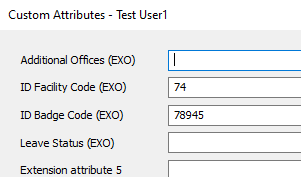

The third issue which caused me to go down this whole road to begin with is, I cannot simply update ExtensionAttribute that is maintained in Exchange Online via the edit user or a form/command. I've had to devise a clever workaround to directly modify mailbox settings and then the ExtensionAttribute which works, but is clunky. And with no visibility of the fields, makes troubleshooting issues with this method more difficult.
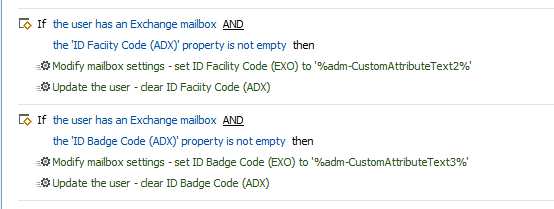
Fourth, I am attempting to use the Update User script here: https://scripts.adaxes.com/import-new-and-updated-users-from-csv-file
yet when I defind simply the username and 2 attributes and run the script, it appears nothing happens.
$csvFilePath = "C:\Users\myprofile\Desktop\imports\testbatch.csv" # TODO: modify me
$userIdColumn = "displayName" # TODO: modify me
$userIdProperty = "userPrincipalName" # TODO: modify me
$accountPasswordColumn = "AccountPassword" # TODO: modify me
$customColumnNames = @{
    "extensionAttribute2" = "adm-CustomAttributeText2";
    "extensionAttribute3" = "adm-CustomAttributeText3";
} # TODO: modify me
$ignoreUnspecifiedColumns = $True # TODO: modify me
$aDObjectProperties = @("Manager", "Secretary") # TODO: modify me
$skipEmptyColumnNames = @("MyColumn") # TODO: modify me
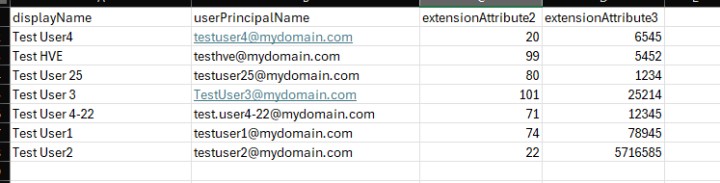
What I am trying to accomplish is get 2 ExtensionAttributes that already have data in them, be visible and editable in Adaxes. The stop-gap I was attempting to make to negate the second issue was to create duplicate fields using the adm-CustomAttribute field and then import the values of the ExtensionAttribute exported from Exchange and use a custom task to sync/overwrite the ExtensionAttributes from the ones saved in Adaxes.
So my questions are:
-
Is it possible to make ExtensionAttributes visible in the user page without clicking all the way into mailbox and custom attributes? And by extension, run a report in Adaxes showing these values as shown in Exchange Online?
-
Is it possible to make visible the adm-CustomAttribute fields regardless if they have data or not?
-
Can I make a form field to fill out the ExtensionAttribute directly rather than using a custom scheduled task to sync adm-CustomAttribute values to ExtensionAttribute
-
How can I bulk import from CSV values to adm-CustomAttribute and verify that they were saved?